Brentsville District High School

Underclassmen
School Portrait Information
School photos for Underclassmen will be taken on August 27 and 28 during the school day.
Underclassmen picture make-up day is October 8.
Parking Permit Information
Parking Passes
Parking Pass Information for the 2026-2027 School Year
Please follow the steps outlined on this website and complete all pieces prior to parking on school grounds.
Access, Complete and Print the PWCS Student Parking Pass Application
- Complete all three pages of the form in their entirety
- Print the completed form
- Sign the completed form
- Submit your $103 payment via PWCS Student Quick Pay
- We get alerts when a payment is made and will update our records
- No cash or checks accepted
- Bring completed Parking Pass Application form and proof of payment to BDHS Main Office during summer office hours 7am-3pm to receive your hanging tag.
Update for the 2026-2027 school year
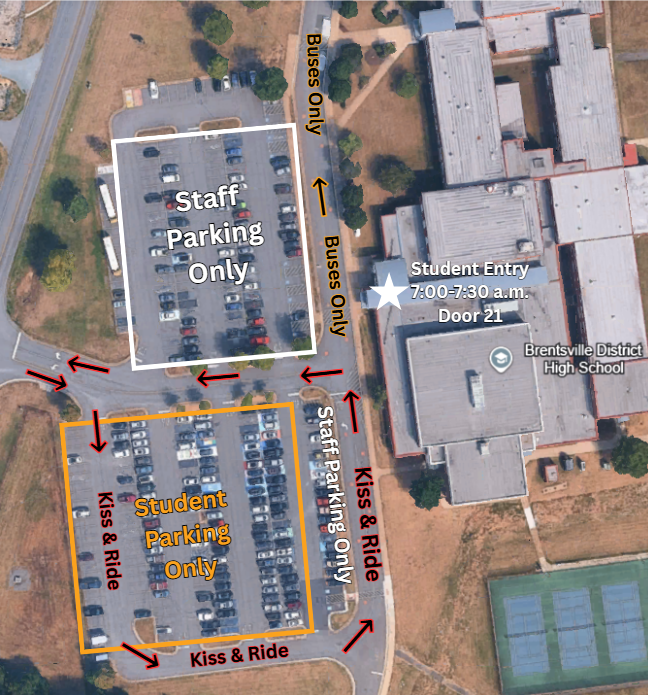
Students may only park on the right side of the front parking lot. Due to renovation, students may no longer park on the left side of the front lot.
How to Purchase a School Yearbook
To purchase a Brentsville yearbook, go to yearbookforever.com/ and search for Brentsville. There are options for a yearbook only or packages including personalization and covers.
You can also submit photos for the yearbook by clicking the Visit Yearbook Snap button at the bottom of the Brentsville page.
Technology Help & Device Tips
When students encounter a technology problem on a school device, there are steps to follow to get assistance.
- Students (or a classmate or teacher) can complete a PWCS Tech Request (link in PWCS Sites folder in Chrome/Edge and in all Canvas courses).
- Our Technical Support Specialist will then reach out to the students and the current classroom teachers via email with further instructions.
- If the device cannot be quickly fixed, a loaner device will be issued for temporary use. Note - Loaner devices are not issued when school devices are forgotten at home.
Some regular device maintenance will keep the school device running efficiently.
- Weekly, students should run updates at home.
- Daily, students should shut down the laptop in the evening and power it back on in the morning. Power down by clicking the Windows key, pressing the Power icon, and choosing Shut down. (Image below)
- Devices should be charged at home every afternoon/evening.
Canvas: Parent Observer Accounts
Observer accounts are available to Prince William County Public Schools parents and/or guardians of students using Canvas.
Observers (parents and/or guardians) can link their Canvas account to their student's account so they can see announcements and other course content. Observers may view the course content, but they cannot participate in the course.
Students and Parents/Guardians can follow the linked directions (PDF in English and Spanish) to set up the Observer accounts.